
Weigl / Software overview
From your timeline.To their experience.
Motion. Lighting. Media. Working together.
Bring your show to life with visual programming, device configuration and flexible scripting. Create on your computer. Deploy to Weigl hardware. Keep everything in sync.
One connected workflow
Configure. Create.
Let it play.
Set up your devices, program the experience and deliver shows to onboard storage. The same system connects your creative tools to the physical world.

Configuration via USB or Ethernet · Programming via WEM-NET or Ethernet switch · Shows and logic stored onboard
Connect & configure
Discover your ProCommander® and Pro I/O™ hardware, set up the network and check device settings with Configurator.
Create & synchronize
Use Showforge® or Conductor to bring animation, lighting, audio, video and show control together on a visual timeline.
Deploy & play
Transfer finished shows and logic to compatible ProCommander hardware for standalone playback. Connect PLCs, media and physical effects.
Visual timeline show creation
Your show, on the timeline.
Choose your creative environment. Keep motion, lighting and media in sync.

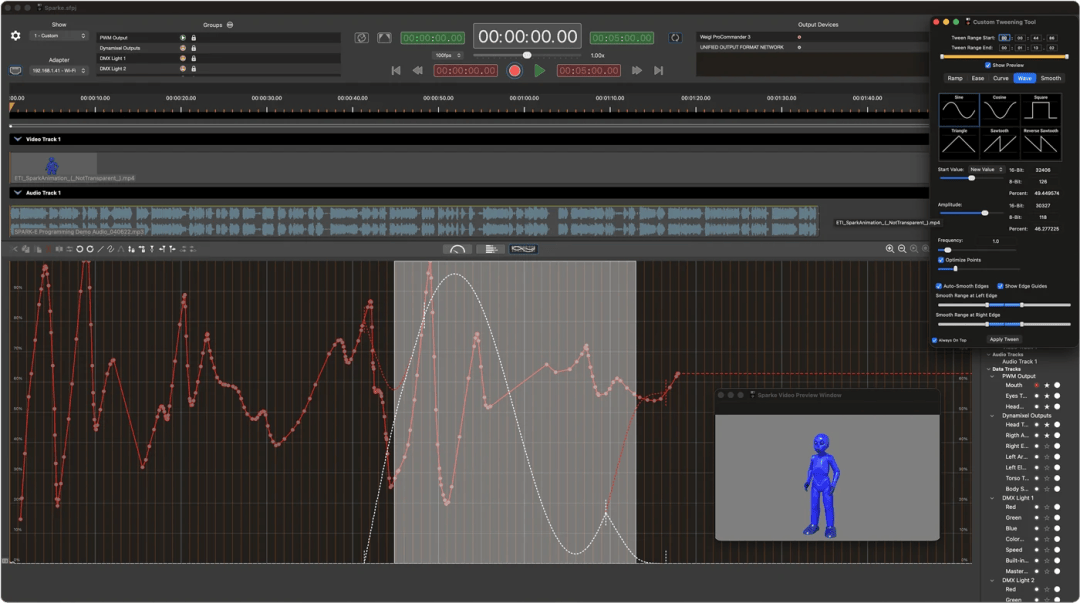
Create motion, lighting and media on the timeline. Import animation from Maya and other popular 3D authoring programs, record live from joysticks and gaming controls, record and create lighting, and edit audio in sync with your show.
Work in Console Mode with Play, Live, Touch, Latch and Record, then switch to Edit or Plot for detailed timing and curve control.
Lighting & I/O
Create lighting effects and work with local DMX, Art-Net and sACN.
Audio
Edit and manipulate audio alongside your show timeline.
Show control & timecode
Bring show control and synchronized playback together.
Motion & animation
Refine movement with interactive plots and tweening tools.
Timeline programming for PC
 *
WindowsA timeline-based show control and production application for Weigl hardware. Record live animation, edit curves and combine digital, analog, lighting and control data with audio and video.
Explore Conductor →* Conductor is compatible with all Weigl hardware, but does not support lighting creation and editing, audio editing and manipulation, or motion interactive plot mode and tweening tools.
Interactive video playback

MotaVision™ software for mVP™ players
Bring video into the show with MotaVision, the playback software behind mVP. Manage media and control playback through a browser or local interface, with onboard scripting for interactive scenes, kiosks and character eyes.
Run independently or connect to Showforge® and Weigl hardware. Synchronize with timecode, trigger playback through UDP, RS-232 or GPIO, and update media through browser uploads, USB or network sharing.
Device configuration
Set up once.
Stay connected for years.
Weigl Configurator
Configure, monitor and maintain your Weigl devices. Your first step to a new system setup, and a tool you can use for years to monitor, trend data and tune complex motor setups.
Build simple show networks or attraction-wide device layouts, with setup, diagnostics and device-specific controls in one place.
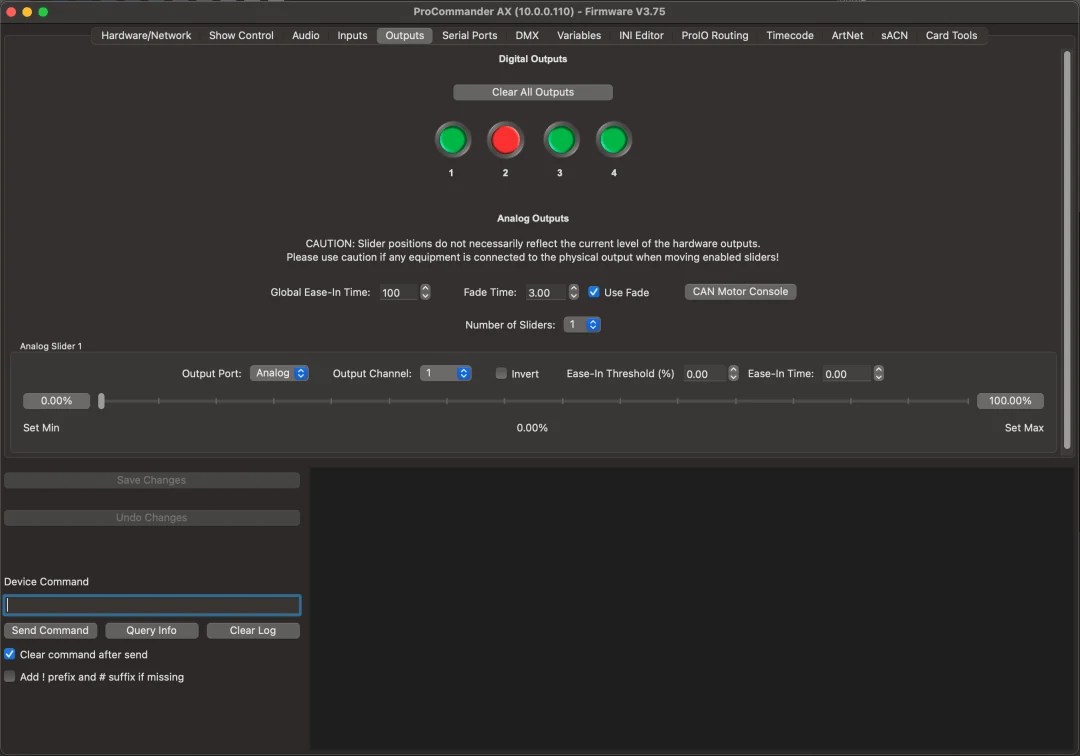


Showforge® and Configurator are developed by Motalab for Weigl products.
 WEM | Script™
 & Control.ini
Go beyond
the timeline.
Customize startup behavior, create simple shows and add interactive logic with WEM | Script and Control.ini. Use a plain text editor or extend your workflow with Visual Studio Code.
Issue commands from timelines, onboard logic or external systems. Integrate show starts, outputs and feedback over supported network, serial or USB connections.
Startup → Device configuration
Inputs → Triggers & interaction
Commands → Shows & outputs
Feedback → External interfaces
Timeline · Onboard · External

Visual Studio Code
A familiar editor.
Smarter scripting.
Use the Weigl WEM | Script extension for syntax highlighting and command snippets that make Control.ini files easier to read and write. The extension also supports vscode.dev.
Modify generated code or create your own show logic, games and playlists. Upload finished code through Configurator or a timeline application. WEM | Script is a free, published protocol; a licensed timeline application is not required to write your own scripts.
Digital Motor Control
Motor feedback & setup
Explore Weigl’s digital motor tools and library for integrating motion into your show, alongside timeline programming and device configuration.
Explore motor control →Ready for the hardware.
Explore the ProCommander® and Pro I/O™ products behind the show.